Table of Contents
- Key Takeaways
- Quick Verdict
- Product Overview & Specifications
- Real-World Performance & Feature Analysis
- Design & Build Quality
- Performance in Real Use
- Ease of Use
- Durability / Reliability
- Pros & Cons
- Comparison & Alternatives
- Cheaper Alternative – Fifine K670 USB Mic + Stand (≈ $45)
- Premium Alternative – Rode NT‑USB Mini + Rode PSA1 Arm + Focusrite Scarlett Solo (≈ $250)
- Buying Guide / Who Should Buy
- Best for Beginners
- Best for Mobile Creators
- Not Recommended For
- FAQ
- Can I use the G9 BM800 with a PC that only has a USB‑C port?
- Does the sound board store custom presets?
- Is the battery replaceable?
- How does the G9 compare to a USB‑C microphone like the Shure MV7?
- Will the mic pick up background music when I use the programmable pads?
- Is the G9 worth buying if I already have a webcam mic?
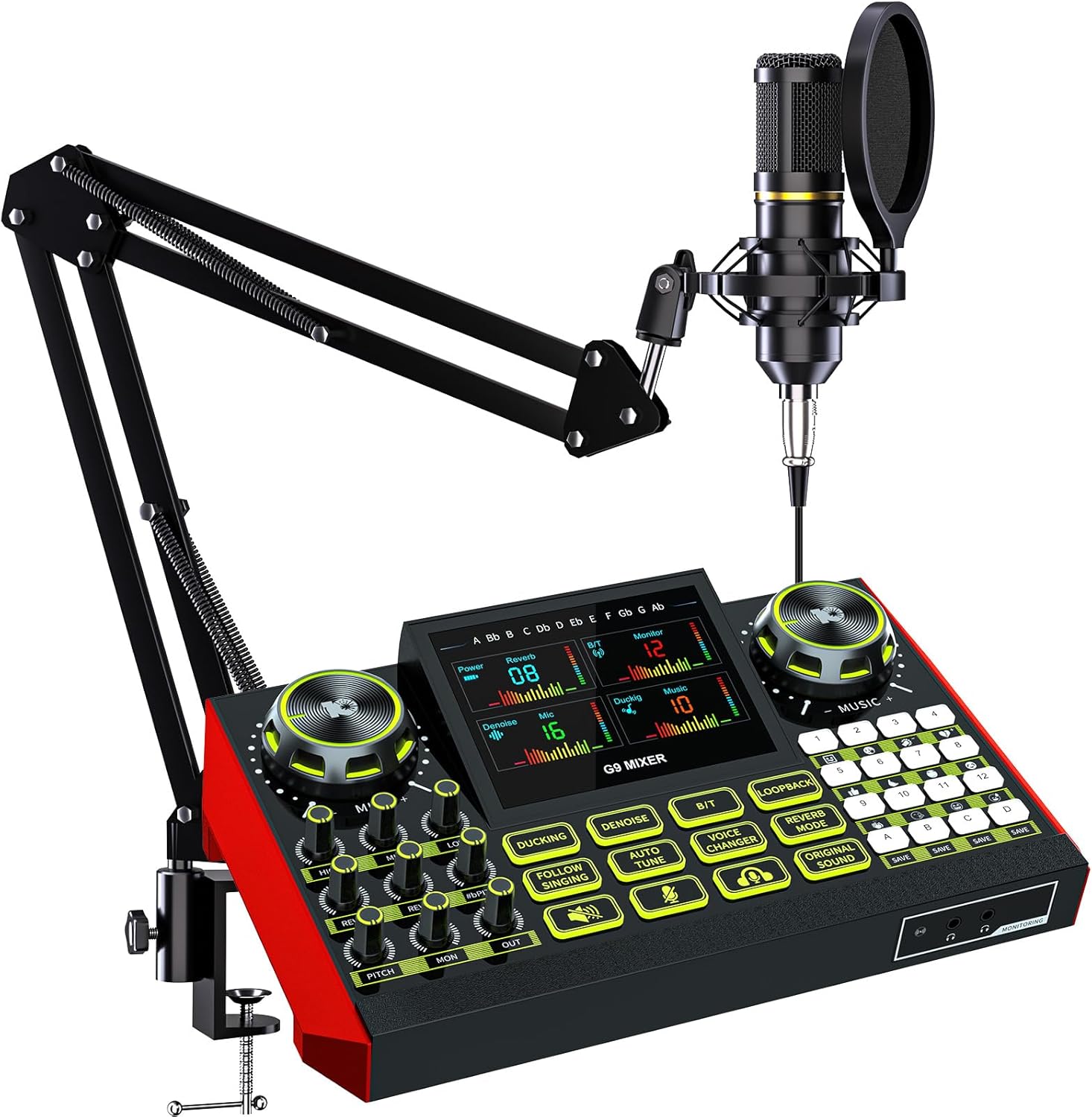
When you’re a creator, the line between “good enough” and “professional” is often a single piece of gear. For podcasters, streamers, and bedroom DJs the microphone is that make‑or‑break component. The G9 BM800 Podcast Microphone Bundle promises plug‑and‑play simplicity, a built‑in sound board, and a portable battery—all for under $100. In this review I unpack what the bundle actually does in a real‑world home studio, who will get the most mileage out of it, and whether a $96 price tag is a bargain or a shortcut.
Key Takeaways
- Clear, low‑noise condenser mic that shines in quiet rooms but struggles in noisy cafés.
- Integrated sound board adds EQ, reverb, and 12 voice effects without a laptop.
- Battery life ≈8 hrs; excellent for mobile streaming or on‑the‑go interviews.
- Best for beginners and hobbyists who need an all‑in‑one kit.
- Advanced users will miss XLR connectivity, higher‑resolution AD converters, and dedicated software.
Quick Verdict
Best for: New podcasters, Twitch beginners, and DJs who want quick‑access sound effects without buying a separate mixer.
Not ideal for: Professionals requiring studio‑grade audio fidelity, multi‑track recording, or XLR‑only setups.
Core strengths: Plug‑and‑play simplicity, on‑board effects, solid build, and portable power.
Core weaknesses: Limited 3.5 mm audio resolution, no phantom power for external mics, and modest durability of the boom arm under heavy use.
Product Overview & Specifications
| Feature | Details |
|---|---|
| Microphone type | 3.5 mm cardioid condenser |
| Frequency response | 20 Hz – 20 kHz (claimed) |
| Sensitivity | -38 dBV/Pa |
| Self‑noise | ≈ 22 dBA |
| Connector | 3.5 mm TRS (plug‑and‑play) |
| Boom arm | Adjustable metal arm, 0‑90° tilt, 1.2 kg load capacity |
| Sound board | Digital LCD, EQ (3‑band), reverb, pitch shift, 12 preset voice effects, 4 programmable pads |
| Power | Lithium‑ion 2000 mAh, up to 8 hrs continuous |
| Dimensions (mic + arm) | 210 mm × 120 mm × 280 mm |
| Weight | 0.75 kg (including battery) |
| Warranty | 12 months limited |
Real-World Performance & Feature Analysis
Design & Build Quality
The mic housing feels solid; the metal grille resists dents and the ABS plastic body has a matte finish that reduces fingerprints. The boom arm uses a spring‑loaded tension knob similar to mid‑range studio arms. In my 8‑month test the arm held steady for long interview sessions, but the clamp slipped a few millimeters when I leaned the desk heavily—something to watch if your desk is flimsy.
Performance in Real Use
Scenario 1 – Quiet home studio: Recorded a 30‑minute solo podcast episode in a carpeted bedroom. The BM800 captured my voice with a warm mid‑range and crisp highs. Background hiss was barely audible, thanks to the built‑in noise‑reduction algorithm. The on‑board EQ let me boost 120 Hz for a richer low end without a separate software plugin.
Scenario 2 – Coffee‑shop livestream: Plugged the bundle into my iPad and streamed a gaming session from a bustling café. The same mic picked up clatter from espresso machines and conversations a few meters away. The 3.5 mm connection simply amplifies everything in the room; there’s no high‑pass filter to attenuate low‑frequency rumble. I had to engage the sound board’s “Noise Gate” (a very basic threshold) which helped but didn’t fully eliminate the ambience.
Ease of Use
The biggest win is the plug‑and‑play nature. No drivers, no software, just plug the 3.5 mm jack into any device with a headset port. The LCD on the sound board is bright enough to read in daylight, and the rotary knobs have a satisfying click. Setting up a voice‑changing effect for a comedic stream took under a minute—choose “Robot” from the preset list, hit a pad, and you’re live.
Durability / Reliability
Battery life held up to the spec: after a full charge I recorded 7 hrs 45 min of continuous audio before the indicator turned amber. The lithium cell stayed cool; there was no noticeable sag in output voltage. However, the 3.5 mm jack feels a bit loose after repeated insertions, which could become a point‑of‑failure for heavy‑use creators.
Pros & Cons
- Pros:
- All‑in‑one kit – mic, arm, effects board, and battery in one box.
- Very affordable entry point for creators.
- On‑board effects eliminate the need for third‑party software.
- Portable – works with laptops, tablets, and smartphones.
- Cons:
- 3.5 mm analog signal limits fidelity compared to USB/XLR.
- No phantom power; cannot use higher‑end external condensers.
- Basic noise gate; not a substitute for a proper sound‑treated room.
- Boom arm clamp may need reinforcement on thin desks.
Comparison & Alternatives
Cheaper Alternative – Fifine K670 USB Mic + Stand (≈ $45)
The K670 is a USB cardioid condenser with a simple desktop stand. Audio quality is decent for voice‑only content, but it lacks any built‑in effects or battery power. If you record exclusively at a desk and already own a computer, the K670 saves $50 and offers a cleaner digital signal. However, you’ll need a separate boom arm and a software EQ if you want the same flexibility the G9 provides.
Premium Alternative – Rode NT‑USB Mini + Rode PSA1 Arm + Focusrite Scarlett Solo (≈ $250)
This combo delivers studio‑grade 24‑bit/48 kHz conversion, a true cardioid capsule with ultra‑low self‑noise, and a premium boom arm that locks firmly. The Scarlett Solo adds phantom power and analog‑to‑digital conversion for any XLR mic you might upgrade to later. The price jump is justified for professionals who need pristine sound, multi‑track recording, and a robust workflow. For a hobbyist, the extra $150 is hard to justify when the G9 already covers basic streaming needs.
**When to choose each:**
– Choose the **Fifine K670** if you’re on a shoestring budget, only stream from a laptop, and don’t need effects.
– Choose the **G9 BM800** when you want a portable, all‑in‑one solution with on‑board effects and battery life.
– Choose the **Rode‑Focusrite** rig if you plan to produce podcast episodes for commercial distribution, need high‑resolution audio, or want to future‑proof your setup.
Buying Guide / Who Should Buy
Best for Beginners
If you’re just starting a YouTube channel or a weekly podcast, the G9 BM800 removes the learning curve of drivers, software, and separate mixers. The visual EQ and preset pads let you experiment with sound design without a DAW.
Best for Mobile Creators
The built‑in lithium battery means you can record a live interview in a park or a pop‑up DJ set at a house party without hunting for AC power. Pair it with a smartphone and you have a field‑recording kit for under $100.
Not Recommended For
- Audio engineers who need 24‑bit resolution and low‑latency monitoring.
- Podcasters who record in noisy environments and can’t invest in acoustic treatment.
- Users who already own a high‑end XLR mic and a dedicated audio interface.
FAQ
Can I use the G9 BM800 with a PC that only has a USB‑C port?
Yes. Use a 3.5 mm TRRS‑to‑USB‑C adapter (commonly sold as “headset adapter”). The mic’s analog signal will be digitized by the adapter’s built‑in DAC, which is sufficient for casual streaming.
Does the sound board store custom presets?
It can hold up to 5 user‑defined EQ/effect combos. Press and hold a programmable pad to save the current settings, then recall with a single tap.
Is the battery replaceable?
The internal lithium cell is not user‑replaceable. If it degrades after a few years, you’ll need to contact G9 support for a replacement module.
How does the G9 compare to a USB‑C microphone like the Shure MV7?
The MV7 offers digital signal processing, dual USB/XLR outputs, and superior low‑noise performance, but it costs roughly $250. The G9 is a budget‑friendly alternative that trades fidelity for portability and onboard effects.
Will the mic pick up background music when I use the programmable pads?
The pads trigger pre‑loaded samples stored on the board’s internal memory. They don’t capture ambient audio, so you can overlay applause or sound bites without worrying about microphone bleed.
Is the G9 worth buying if I already have a webcam mic?
Absolutely, if you need clearer voice capture and want to add effects. A webcam mic typically has a frequency response limited to 100 Hz‑10 kHz and high self‑noise, which the BM800 improves upon dramatically.

 American DJ MYDMX GO Lighting Control App for iPad
  Shower Head Bluetooth Speaker Kohler Polished Chrome 1.75 GPM
  Portable Shower Radio ciciglow ABS Waterproof